Java学习(二)– 面向对象基础
https://www.bilibili.com/video/BV1fh411y7R8/?spm_id_from=333.999.0.0&vd_source=594d36a0860080a36fe599e0b84e5fb2
一、类与对象 1.1 问题引出
类是抽象的,概念的,代表一类事物,比如人类,猫类.., 即它是数据类型.
对象是具体的,实际的,代表一个具体事物, 即 是实例.
类是对象的模板,对象是类的一个个体,对应一个实例
1
2
3
4
5
6
7
8
9
10
11
12
13
14
15
16
17
18
19
20
21
22
23
24
25
26
27
28
29
30
31
32
33
34
35
36
37
38
39
40
41
42
43
44
45
46
47
48
49
50
51
52
53
54
55
56
57
58
59
60
61
62
63
64
65
66
67
68
69
70
71
72
73
74
public class Object01 { public static void main (String[] args) { Cat cat1 = new Cat (); cat1.name = "小白" ; cat1.age = 3 ; cat1.color = "白色" ; cat1.weight = 10 ; Cat cat2 = new Cat (); cat2.name = "小花" ; cat2.age = 100 ; cat2.color = "花色" ; cat2.weight = 20 ; System.out.println("第1只猫信息" + cat1.name + " " + cat1.age + " " + cat1.color + " " + cat1.weight); System.out.println("第2只猫信息" + cat2.name + " " + cat2.age + " " + cat2.color + " " + cat2.weight); } } class Cat { String name; int age; String color; }
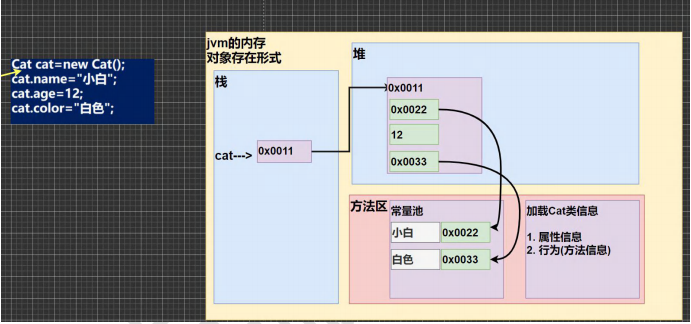
1.2 对象在内存中的存在形式 (※) 创建一个新的对象的时候相当于在堆区中开辟了一块空间,
在栈区中的变量名指向这个堆区的地址,
如果属性是 基本数据类型 则直接存储在堆区中,
如果是 引用类型 则存储在堆区中的是一个在方法区的地址, 真正的内容存储在方法区中
1.3 属性
属性的定义语法同变量,示例:访问修饰符 属性类型 属性名;
属性的定义类型可以为任意类型,包含基本类型或引用类型
属性如果不赋值,有默认值,规则和数组一致。具体说:
int 0,short 0, byte 0, long 0, float 0.0,double 0.0,char \u0000,boolean false,String null
1
2
3
4
5
6
7
8
9
10
11
12
13
14
15
16
17
18
19
20
21
22
23
24
25
26
public class PropertiesDetail { public static void main (String[] args) { Person p1 = new Person (); System.out.println("\n当前这个人的信息" ); System.out.println("age=" + p1.age + " name=" + p1.name + " sal=" + p1.sal + " isPass=" + p1.isPass) ; } } class Person { int age; String name; double sal; boolean isPass; }
1.3.1 创建对象
先声明再创建
Cat cat ; //声明对象 cat
cat = new Cat(); //创建
直接创建
Cat cat = new Cat();
1.3.2 访问属性 基本语法
对象名.属性名;
案例演示赋值和输出
cat.name ;
cat.age;
cat.color;
1.4 类和对象内存分配机制 (※)
栈: 一般存放基本数据类型 (局部变量)
堆: 存放对象 (Cat cat , 数组等)
方法区:常量池 (常量,比如字符串), 类加载信息
1
2
3
4
5
6
7
8
9
10
11
12
13
14
15
16
17
18
19
20
21
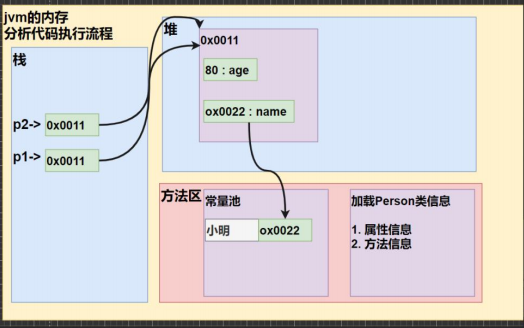
public class Object03 { public static void main (String[] args) { Person p1=new Person (); p1.age=10 ; p1.name="小明" ; Person p2=p1; System.out.println(p2.age); } } class Person { String name; int age; }
先加载 Person 类信息 (属性和方法信息, 只会加载一次)
在堆中分配空间, 进行默认初始化 (看规则)
把地址赋给 p , p 就指向对象
进行指定初始化, 比如 p.name =”jack” p.age = 10
跟数组的存储机制比较像, 可以类比理解, 不要强行记忆
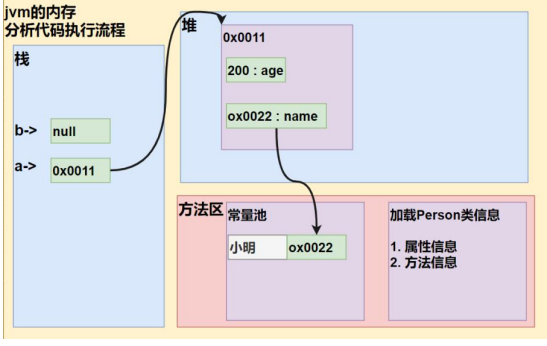
如果是 null 的话就什么都不指向
二、成员方法 2.1 问题引出 1 2 3 4 5 6 7 8 9 10 11 12 13 14 15 16 17 18 19 20 21 22 23 24 25 26 27 28 29 30 31 32 33 34 35 36 37 38 39 40 41 42 43 44 45 46 47 48 49 50 51 52 53 54 55 56 57 58 59 60 61 62 63 64 65 66 67 68 69 70 71 public class Method01 { public static void main (String[] args) { Person p1 = new Person (); p1.speak(); p1.cal01(); p1.cal02(5 ); p1.cal02(10 ); int returnRes = p1.getSum(10 , 20 ); System.out.println("getSum方法返回的值=" + returnRes); } } class Person { String name; int age; public void speak () { System.out.println("我是一个好人" ); } public void cal01 () { int res = 0 ; for (int i = 1 ; i <= 1000 ; i++) { res += i; } System.out.println("cal01方法 计算结果=" + res); } public void cal02 (int n) { int res = 0 ; for (int i = 1 ; i <= n; i++) { res += i; } System.out.println("cal02方法 计算结果=" + res); } public int getSum (int num1, int num2) { int res = num1 + num2; return res; } }
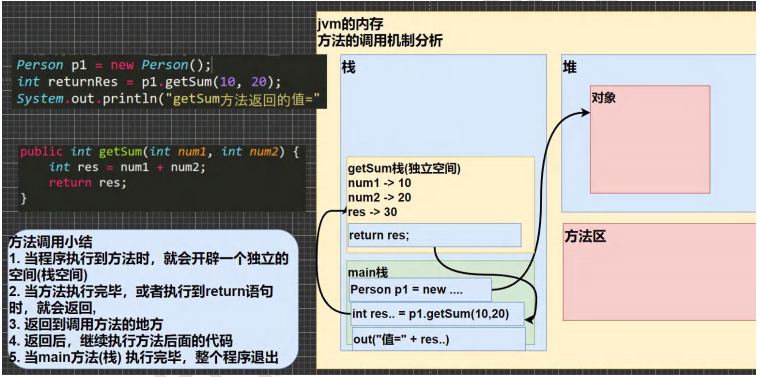
2.2 方法调用机制 (※) 每个方法调用的时候会开辟一个新的栈空间,
除非使用 return , 否则每个占空间相互独立互不干扰
一个方法结束后占空间会销毁
程序结束后 main 栈空间销毁
2.3 成员方法的好处及使用 2.3.1 好处
提高代码的复用性
可以将实现的细节封装起来,然后供其他用户来调用即可
1 2 3 4 5 6 7 8 9 10 11 12 13 14 15 16 17 18 19 20 21 22 23 24 25 26 27 28 29 30 31 32 33 34 35 36 37 38 39 40 41 42 43 44 45 46 47 48 49 50 51 52 53 54 55 56 57 58 59 60 61 62 63 public class Method02 { public static void main (String[] args) { int [][] map = {{0 ,0 ,1 },{1 ,1 ,1 },{1 ,1 ,3 }}; MyTools tool = new MyTools (); tool.printArr(map); tool.printArr(map); tool.printArr(map); } } class MyTools { public void printArr (int [][] map) { System.out.println("=======" ); for (int i = 0 ; i < map.length; i++) { for (int j = 0 ; j < map[i].length; j++) { System.out.print(map[i][j] + "_" ); } System.out.println(); } } }
2.3.2 成员方法的定义 访问修饰符 返回数据类型 方法名(形参列表..) {//方法体
语句;
return 返回值;
}
形参列表:表示成员方法输入 cal(int n) , getSum(int num1, int num2)
返回数据类型:表示成员方法输出, void 表示没有返回值
方法主体:表示为了实现某一功能代码块
return 语句不是必须的。
2.3.3 方法使用细节
一个方法最多有一个返回值 [思考,如何返回多个结果 返回数组 ]
返回类型可以为任意类型,包含基本类型或引用类型(数组,对象)
如果方法要求有返回数据类型,则方法体中最后的执行语句必须为 return 值;
而且要求返回值类型必须和 return 的值类型一致或兼容
如果方法是 void,则方法体中可以没有 return 语句,或者 只写 return ;
方法名遵循驼峰命名法,最好见名知义,表达出该功能的意思即可, 比如 得到两个数的和 getSum, 开发中按照规范
1 2 3 4 5 6 7 8 9 10 11 12 13 14 15 16 17 18 19 20 21 22 23 24 25 26 27 28 29 30 31 32 33 34 35 36 37 38 39 40 41 42 43 44 45 46 47 48 49 50 51 52 53 54 55 56 57 58 59 60 61 62 63 64 65 66 67 68 69 70 71 72 73 74 75 public class MethodDetail { public static void main (String[] args) { AA a = new AA (); int [] res = a.getSumAndSub(1 , 4 ); System.out.println("和=" + res[0 ]); System.out.println("差=" + res[1 ]); byte b1 = 1 ; byte b2 = 2 ; a.getSumAndSub(b1, b2); a.f3("tom" , 10 ); } } class AA { public void f4 () { } public void f3 (String str, int n) { } public int [] getSumAndSub(int n1, int n2) { int [] resArr = new int [2 ]; resArr[0 ] = n1 + n2; resArr[1 ] = n1 - n2; return resArr; } public double f1 () { double d1 = 1.1 * 3 ; int n = 100 ; return n; } public void f2 () { System.out.println("hello1" ); System.out.println("hello1" ); System.out.println("hello1" ); int n = 10 ; } }
2.3.4 方法调用细节 1 2 3 4 5 6 7 8 9 10 11 12 13 14 15 16 17 18 19 20 21 22 23 24 25 26 27 28 29 30 31 32 33 34 35 36 37 38 39 40 41 42 43 public class MethodDetail02 { public static void main (String[] args) { A a = new A (); a.m1(); } } class A { public void print (int n) { System.out.println("print()方法被调用 n=" + n); } public void sayOk () { print(10 ); System.out.println("继续执行sayOK()~~~" ); } public void m1 () { System.out.println("m1() 方法被调用" ); B b = new B (); b.hi(); System.out.println("m1() 继续执行:)" ); } } class B { public void hi () { System.out.println("B类中的 hi()被执行" ); } }
2.4 练习 1 2 3 4 5 6 7 8 9 10 11 12 13 14 15 16 17 18 19 20 21 22 23 24 25 26 27 28 29 30 31 32 33 34 35 36 37 38 39 40 41 42 43 44 45 46 47 48 49 50 51 52 53 54 55 56 57 58 59 60 61 62 63 64 public class MethodExercise01 { public static void main (String[] args) { AA a = new AA (); a.print(4 , 4 , '#' ); } } class AA { public boolean isOdd (int num) { return num % 2 != 0 ; } public void print (int row, int col, char c) { for (int i = 0 ; i < row; i++) { for (int j = 0 ; j < col; j++) { System.out.print(c); } System.out.println(); } } }
三、成员方法传参机制 (※) 3.1 基本数据类型传参机制 基本数据类型,传递的是值 (值拷贝),形参的任何改变不影响实参
main 方法中的两个数在 main 栈区
swap 方法中的两个数在 swap 栈区
两个栈区互补干扰, 既然是基本数据类型, 那么数据都存储在栈区中, 没有指向堆区中的地址
所以在没有 return 的情况下两个栈区互补干扰, 不能做到数据交换的目的
1 2 3 4 5 6 7 8 9 10 11 12 13 14 15 16 17 18 19 20 21 22 23 24 25 26 public class MethodParameter01 { public static void main (String[] args) { int a = 10 ; int b = 20 ; AA obj = new AA (); obj.swap(a, b); System.out.println("main方法 a=" + a + " b=" + b); } } class AA { public void swap (int a,int b) { System.out.println("\na和b交换前的值\na=" + a + "\tb=" + b); int tmp = a; a = b; b = tmp; System.out.println("\na和b交换后的值\na=" + a + "\tb=" + b); } }
3.2 引用数据类型传参机制 引用类型传递的是地址(传递也是值,但是值是地址),可以通过形参影响实参
引用类型存储在堆区中, 变量存储的是这个堆区的地址
main 方法与 test100 方法的栈区都存储的是堆区的地址, 这个地址指向一个地方, test100 中的修改可以影响 main 的输出
而在 test200 中, 新建了一个对象, 这就说明现在堆区中有两个对象
而新建的对象在 test200 的栈区中存储的指向堆区的地址是新建的对象的地址, 不会与原来的地方产生关联, 所以不会影响 main 的输出
p = null 指向为空, 啥都不影响
直接通过 test200 方法中调用属性 p.age 当然会直接对堆区的对象值进行修改
1 2 3 4 5 6 7 8 9 10 11 12 13 14 15 16 17 18 19 20 21 22 23 24 25 26 27 28 29 30 31 32 33 34 35 36 37 38 39 40 41 42 43 44 45 46 47 48 49 50 51 52 53 54 public class MethodParameter02 { public static void main (String[] args) { B b = new B (); int [] arr = {1 , 2 , 3 }; b.test100(arr); System.out.println(" main的 arr数组 " ); for (int i = 0 ; i < arr.length; i++) { System.out.print(arr[i] + "\t" ); } System.out.println(); Person p = new Person (); p.name = "jack" ; p.age = 10 ; b.test200(p); System.out.println("main 的p.age=" + p.age); } } class Person { String name; int age; } class B { public void test200 (Person p) { p = new Person (); p.name = "tom" ; p.age = 99 ; } public void test100 (int [] arr) { arr[0 ] = 200 ; System.out.println(" test100的 arr数组 " ); for (int i = 0 ; i < arr.length; i++) { System.out.print(arr[i] + "\t" ); } System.out.println(); } }
3.3 对象克隆 有点类似数组的克隆, 可以对比理解, 不要死记硬背
1 2 3 4 5 6 7 8 9 10 11 12 13 14 15 16 17 18 19 20 21 22 23 24 25 26 27 28 29 30 31 32 33 34 35 36 37 38 39 40 41 42 43 44 45 46 public class MethodExercise02 { public static void main (String[] args) { Person p = new Person (); p.name = "milan" ; p.age = 100 ; MyTools tools = new MyTools (); Person p2 = tools.copyPerson(p); System.out.println("p的属性 age=" + p.age + " 名字=" + p.name); System.out.println("p2的属性 age=" + p2.age + " 名字=" + p2.name); System.out.println(p == p2); } } class Person { String name; int age; } class MyTools { public Person copyPerson (Person p) { Person p2 = new Person (); p2.name = p.name; p2.age = p.age; return p2; } }
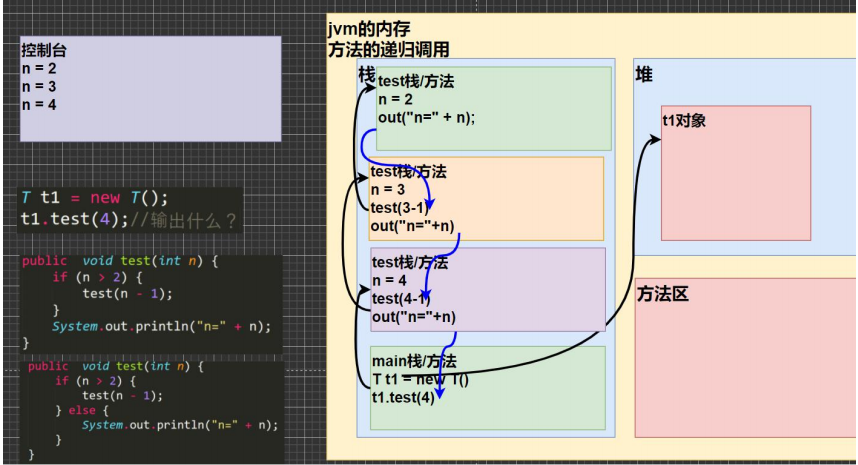
3.4 方法递归调用 (※) 3.4.1 问题引出 1 2 3 4 5 6 7 8 9 10 11 12 13 14 15 16 17 18 19 20 21 22 23 24 25 26 27 28 29 30 31 32 33 public class Recursion01 { public static void main (String[] args) { T t1 = new T (); t1.test(4 ); int res = t1.factorial(5 ); System.out.println("5的阶乘 res =" + res); } } class T { public void test (int n) { if (n > 2 ) { test(n - 1 ); } System.out.println("n=" + n); } public int factorial (int n) { if (n == 1 ) { return 1 ; } else { return factorial(n - 1 ) * n; } } }
3.4.2 递归时的内存机制
每次执行一个方法就是创建一个新的受保护的独立栈空间
每个方法中, 即每个栈空间中的局部变量 是独立的, 不会互相影响, 比如下图的 n
当然如果这些方法中使用的是引用类型变量 (数组, 对象等) , 就会共享这个引用类型变量的数据
递归时必须向退出递归的条件逼近, 否则就是无限递归
当一个方法执行完毕之后, 或者遇到 return 就会返回, 遵守谁调用就返回给谁的原则
就是说当方法执行完毕或者返回时, 这个方法就完事了, 销毁
递归就像是一个栈, 如下图所示, 从 main 方法开始一直调用 test 方法, 不断开辟栈空间, 然后从最后开辟的栈空间开始逐渐返回, 返回一个销毁一个, 最后回到 main
3.4.3 斐波那契数列与猴子吃桃 1 2 3 4 5 6 7 8 9 10 11 12 13 14 15 16 17 18 19 20 21 22 23 24 25 26 27 28 29 30 31 32 33 34 35 36 37 38 39 40 41 42 43 44 45 46 47 48 49 50 51 52 53 54 55 56 57 58 59 60 61 62 63 64 65 66 67 68 69 70 71 public class RecursionExercise01 { public static void main (String[] args) { T t1 = new T (); int n = 7 ; int res = t1.fibonacci(n); if (res != -1 ) { System.out.println("当n=" + n +" 对应的斐波那契数=" + res); } int day = 0 ; int peachNum = t1.peach(day); if (peachNum != -1 ) { System.out.println("第 " + day + "天有" + peachNum + "个桃子" ); } } } class T { public int fibonacci (int n) { if ( n >= 1 ) { if ( n == 1 || n == 2 ) { return 1 ; } else { return fibonacci(n-1 ) + fibonacci(n-2 ); } } else { System.out.println("要求输入的n>=1的整数" ); return -1 ; } } public int peach (int day) { if (day == 10 ) { return 1 ; } else if ( day >= 1 && day <=9 ) { return (peach(day + 1 ) + 1 ) * 2 ; } else { System.out.println("day在1-10" ); return -1 ; } } }
3.4.4 迷宫问题 1 2 3 4 5 6 7 8 9 10 11 12 13 14 15 16 17 18 19 20 21 22 23 24 25 26 27 28 29 30 31 32 33 34 35 36 37 38 39 40 41 42 43 44 45 46 47 48 49 50 51 52 53 54 55 56 57 58 59 60 61 62 63 64 65 66 67 68 69 70 71 72 73 74 75 76 77 78 79 80 81 82 83 84 85 86 87 88 89 90 91 92 93 94 95 96 97 98 99 100 101 102 103 104 105 106 107 108 109 110 111 112 113 114 115 116 117 118 119 120 121 122 123 124 125 126 127 128 129 130 public class MiGong { public static void main (String[] args) { int [][] map = new int [8 ][7 ]; for (int i = 0 ; i < 7 ; i++) { map[0 ][i] = 1 ; map[7 ][i] = 1 ; } for (int i = 0 ; i < 8 ; i++) { map[i][0 ] = 1 ; map[i][6 ] = 1 ; } map[3 ][1 ] = 1 ; map[3 ][2 ] = 1 ; map[2 ][2 ] = 1 ; System.out.println("=====当前地图情况======" ); for (int i = 0 ; i < map.length; i++) { for (int j = 0 ; j < map[i].length; j++) { System.out.print(map[i][j] + " " ); } System.out.println(); } T t1 = new T (); t1.findWay(map, 1 , 1 ); System.out.println("\n====找路的情况如下=====" ); for (int i = 0 ; i < map.length; i++) { for (int j = 0 ; j < map[i].length; j++) { System.out.print(map[i][j] + " " ); } System.out.println(); } } } class T { public boolean findWay (int [][] map , int i, int j) { if (map[6 ][5 ] == 2 ) { return true ; } else { if (map[i][j] == 0 ) { map[i][j] = 2 ; if (findWay(map, i + 1 , j)) { return true ; } else if (findWay(map, i, j + 1 )){ return true ; } else if (findWay(map, i-1 , j)) { return true ; } else if (findWay(map, i, j-1 )){ return true ; } else { map[i][j] = 3 ; return false ; } } else { return false ; } } } public boolean findWay2 (int [][] map , int i, int j) { if (map[6 ][5 ] == 2 ) { return true ; } else { if (map[i][j] == 0 ) { map[i][j] = 2 ; if (findWay2(map, i - 1 , j)) { return true ; } else if (findWay2(map, i, j + 1 )){ return true ; } else if (findWay2(map, i+1 , j)) { return true ; } else if (findWay2(map, i, j-1 )){ return true ; } else { map[i][j] = 3 ; return false ; } } else { return false ; } } } }
3.4.5 汉诺塔 1 2 3 4 5 6 7 8 9 10 11 12 13 14 15 16 17 18 19 20 21 22 23 24 25 26 27 28 29 30 public class HanoiTower { public static void main (String[] args) { Tower tower = new Tower (); tower.move(64 , 'A' , 'B' , 'C' ); } } class Tower { public void move (int num , char a, char b ,char c) { if (num == 1 ) { System.out.println(a + "->" + c); } else { move(num - 1 , a, c, b); System.out.println(a + "->" + c); move(num - 1 , b, a, c); } } }
四、方法重载
Java 中允许同一个类中,多个同名方法的存在,但要求 形参列表不一致
4.1 使用细节
方法名必须相同
形参列表必须不同 (形参类型, 个数, 顺序, 至少有一个不同, 参数名没有要求)
返回类型没有要求
必须要在相同的方法名上做区分, 这样才能判定用哪个方法, 所以形参列表必须想办法不同
1 2 3 4 5 6 7 8 9 10 11 12 13 14 15 16 17 18 19 20 21 22 23 24 25 26 27 28 29 30 31 32 33 34 35 36 37 38 39 40 41 42 43 44 45 46 47 48 49 50 51 52 53 54 55 public class OverLoad01 { public static void main (String[] args) { MyCalculator mc = new MyCalculator (); System.out.println(mc.calculate(1 , 2 )); System.out.println(mc.calculate(1.1 , 2 )); System.out.println(mc.calculate(1 , 2.1 )); } } class MyCalculator { public int calculate (int n1, int n2) { System.out.println("calculate(int n1, int n2) 被调用" ); return n1 + n2; } public double calculate (int n1, double n2) { return n1 + n2; } public double calculate (double n1, int n2) { System.out.println("calculate(double n1, int n2) 被调用.." ); return n1 + n2; } public int calculate (int n1, int n2,int n3) { return n1 + n2 + n2; } }
4.2 练习 1 2 3 4 5 6 7 8 9 10 11 12 13 14 15 16 17 18 19 20 21 22 23 24 25 26 27 28 29 30 31 32 33 34 35 36 37 38 39 40 41 42 43 44 45 46 47 48 49 50 51 52 53 54 55 56 57 58 59 60 61 62 63 64 65 66 67 68 69 70 71 72 73 74 75 76 77 78 79 80 81 82 83 84 85 86 87 88 89 90 public class OverLoadExercise { public static void main (String[] args) { Methods method = new Methods (); method.m(10 ); method.m(10 , 20 ); method.m("韩顺平教育 hello" ); System.out.println(method.max(10 , 24 )); System.out.println(method.max(10.0 , 21.4 )); System.out.println(method.max(10.0 , 1.4 , 30.0 )); } } class Methods { public int max (int n1, int n2) { return n1 > n2 ? n1 : n2; } public double max (double n1, double n2) { return n1 > n2 ? n1 : n2; } public double max (double n1, double n2, double n3) { System.out.println("max(double n1, double n2, double n3)" ); double max1 = n1 > n2 ? n1 : n2; return max1 > n3 ? max1 : n3; } public double max (double n1, double n2, int n3) { System.out.println("max(double n1, double n2, int n3)" ); double max1 = n1 > n2 ? n1 : n2; return max1 > n3 ? max1 : n3; } public void m (int n) { System.out.println("平方=" + (n * n)); } public void m (int n1, int n2) { System.out.println("相乘=" + (n1 * n2)); } public void m (String str) { System.out.println("传入的str=" + str); } }
五、可变参数
Java 允许将同一个类中多个同名同功能 但参数个数不同 的方法,封装成一个方法
1 2 3 4 5 6 7 8 9 10 11 12 13 14 15 16 17 18 19 20 21 22 23 24 25 26 27 28 29 30 31 32 33 34 35 36 37 38 39 public class VarParameter01 { public static void main (String[] args) { HspMethod m = new HspMethod (); System.out.println(m.sum(1 , 5 , 100 )); System.out.println(m.sum(1 ,19 )); } } class HspMethod { public int sum (int ... nums) { int res = 0 ; for (int i = 0 ; i < nums.length; i++) { res += nums[i]; } return res; } }
5.1 使用细节
可变参数实参可以为 0 或 任意多个
可变参数实参可以为数组
可变参数实参本质就是数组
可变参数可以和普通类型的参数放在一个形参列表, 但是可变参数必须在后面
一个形参列表中只能有一个可变参数
1 2 3 4 5 6 7 8 9 10 11 12 13 14 15 16 17 18 19 20 21 22 23 24 25 26 27 28 public class VarParameterDetail { public static void main (String[] args) { int [] arr = {1 , 2 , 3 }; T t1 = new T (); t1.f1(arr); } } class T { public void f1 (int ... nums) { System.out.println("长度=" + nums.length); } public void f2 (String str, double ... nums) { } }
5.2 练习 1 2 3 4 5 6 7 8 9 10 11 12 13 14 15 16 17 18 19 20 21 22 23 24 25 26 27 28 29 30 public class VarParameterExercise { public static void main (String[] args) { HspMethod hm = new HspMethod (); System.out.println(hm.showScore("milan" , 90.1 , 80.0 )); System.out.println(hm.showScore("terry" , 90.1 , 80.0 ,10 ,30.5 ,70 )); } } class HspMethod { public String showScore (String name ,double ... scores ) { double totalScore = 0 ; for (int i = 0 ; i < scores.length; i++) { totalScore += scores[i]; } return name + " 有 " +scores.length + "门课的成绩总分为=" + totalScore; } }
六、作用域
在java编程中, 主要的变量就是属性 (成员变量) 和局部变量。
我们说的局部变量一般是指在成员方法中定义的变量。 [举例Cat类: cry]
java中作用域的分类属性 ,作用域为整个类体Cat类: cry eat等方法使用属性
全局变量 (属性) 可以不赋值,直接使用,因为有默认值 (与数组默认值一样),局部变量必须赋值后才能使用,因为没有默认值
1 2 3 4 5 6 7 8 9 10 11 12 13 14 15 16 17 18 19 20 21 22 23 24 25 26 27 28 29 30 31 32 33 34 35 36 37 38 39 40 41 public class VarScope { public static void main (String[] args) { } } class Cat { int age = 10 ; double weight; public void hi () { int num = 1 ; String address = "北京的猫" ; System.out.println("num=" + num); System.out.println("address=" + address); System.out.println("weight=" + weight); } public void cry () { int n = 10 ; String name = "jack" ; System.out.println("在cry中使用属性 age=" + age); } public void eat () { System.out.println("在eat中使用属性 age=" + age); } }
属性和局部变量可以重名,访问时遵循就近原则。
在同一个作用域中,比如在同一个成员方法中,两个局部变量,不能重名
属性生命周期较长,伴随着对象的创建而创建,伴随着对象的销毁而销毁。
局部变量,生命周期较短,伴随着它的代码块的执行而创建,伴随着代码块的结束而销毁。即在一次方法调用过程中。
作用域范围不同
修饰符不同
1 2 3 4 5 6 7 8 9 10 11 12 13 14 15 16 17 18 19 20 21 22 23 24 25 26 27 28 29 30 31 32 33 34 35 36 37 38 39 40 41 42 43 44 45 46 47 48 49 50 51 52 53 54 public class VarScopeDetail { public static void main (String[] args) { Person p1 = new Person (); T t1 = new T (); t1.test(); t1.test2(p1); } } class T { public void test () { Person p1 = new Person (); System.out.println(p1.name); } public void test2 (Person p) { System.out.println(p.name); } } class Person { public int age = 20 ; String name = "jack" ; public void say () { String name = "king" ; System.out.println("say() name=" + name); } public void hi () { String address = "北京" ; String name = "hsp" ; } }
七、构造器 基本语法:
[修饰符] 方法名(形参列表){
方法体;
}
构造器的修饰符可以默认, 也可以是 public protected private
构造器没有返回值
方法名 和类名字必须一样
参数列表 和 成员方法一样的规则
构造器的调用, 由系统完成
构造方法又叫构造器(constructor),是类的一种特殊的方法,它的主要作用是完成对新对象的初始化。它有几个特点:
方法名和类名相同
没有返回值
在创建对象时,系统会自动的调用该类的构造器完成对象的初始化。
1 2 3 4 5 6 7 8 9 10 11 12 13 14 15 16 17 18 19 20 21 22 23 24 25 26 27 28 29 public class Constructor01 { public static void main (String[] args) { Person p1 = new Person ("smith" , 80 ); System.out.println("p1的信息如下" ); System.out.println("p1对象name=" + p1.name); System.out.println("p1对象age=" + p1.age); } } class Person { String name; int age; public Person (String pName, int pAge) { System.out.println("构造器被调用~~ 完成对象的属性初始化" ); name = pName; age = pAge; } }
7.1 使用细节
一个类可以定义多个不同的构造器,即构造器重载
构造器名和类名要相同
构造器没有返回值
构造器是完成对象的初始化,并不是创建对象
在创建对象时,系统自动的调用该类的构造方法
如果程序员没有定义构造器,系统会自动给类生成一个默认无参构造器(也叫默认构造器),比如Dog (){},使用javap指令反编译看看
一旦定义了自己的构造器,默认的构造器就覆盖了,就不能再使用默认的无参构造器,除非显式的定义一下
1 2 3 4 5 6 7 8 9 10 11 12 13 14 15 16 17 18 19 20 21 22 23 24 25 26 27 28 29 30 31 32 33 34 35 36 37 38 39 40 41 42 43 44 45 public class ConstructorDetail { public static void main (String[] args) { Person p1 = new Person ("king" , 40 ); Person p2 = new Person ("tom" ); Dog dog1 = new Dog (); } } class Dog { public Dog (String dName) { } Dog() { } } class Person { String name; int age; public Person (String pName, int pAge) { name = pName; age = pAge; } public Person (String pName) { name = pName; } }
7.2 练习 1 2 3 4 5 6 7 8 9 10 11 12 13 14 15 16 17 18 19 20 21 22 23 24 25 26 27 28 29 30 31 32 33 34 35 36 37 38 public class ConstructorExercise { public static void main (String[] args) { Person p1 = new Person (); System.out.println("p1的信息 name=" + p1.name + " age=" + p1.age); Person p2 = new Person ("scott" , 50 ); System.out.println("p2的信息 name=" + p2.name + " age=" + p2.age); } } class Person { String name; int age; public Person () { age = 18 ; } public Person (String pName, int pAge) { name = pName; age = pAge; } }
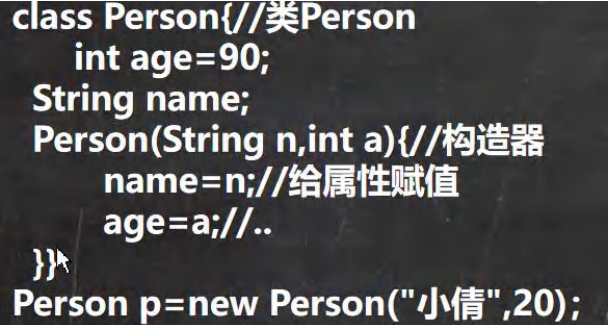
八、对象创建流程分析 (面试)
在方法区中加载 Person 类信息 (Person.class), 只会加载一次
在堆区中为新 new 的对象分配空间, 具有一个内存地址
先进行属性的默认初始化, age = 0, name = null
然后进行属性的显示初始化, age = 90, name = null
最后进行构造器的初始化, age = 20, name = "小倩"
将对象在堆区中的地址返回给变量 p, 这个 p 是对象名, 也可以说是对象的引用, 真正的对象是堆区中开辟的那块空间, p 只是一个代理
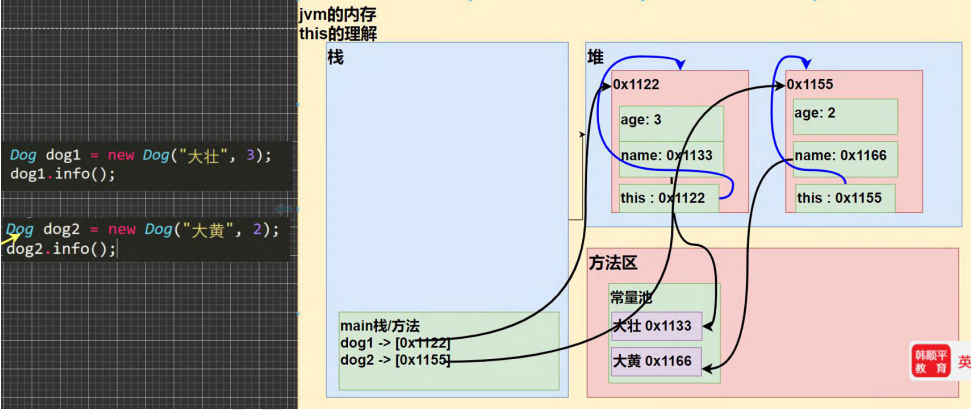
十、this 10.1 问题引出 1 2 3 4 5 6 7 8 9 10 11 12 13 14 15 16 17 18 19 20 21 22 23 24 25 26 27 28 29 30 31 32 33 34 35 36 37 38 39 40 41 42 43 44 45 public class This01 { public static void main (String[] args) { Dog dog1 = new Dog ("大壮" , 3 ); System.out.println("dog1的hashcode=" + dog1.hashCode()); dog1.info(); System.out.println("============" ); Dog dog2 = new Dog ("大黄" , 2 ); System.out.println("dog2的hashcode=" + dog2.hashCode()); dog2.info(); } } class Dog { String name; int age; public Dog (String name, int age) { this .name = name; this .age = age; System.out.println("this.hashCode=" + this .hashCode()); } public void info () { System.out.println("this.hashCode=" + this .hashCode()); System.out.println(name + "\t" + age + "\t" ); } }
10.2 深入理解 this this 就是每个对象创建之后赋予的一个隐藏属性, 哪个对象调用, this 就代表哪个对象 (字面意思, this 的值就是这个对象在堆区的地址)
10.3 使用细节
this 关键字可以用来访问本类的属性、方法、构造器
this 用于区分当前类的属性和局部变量
访问成员方法的语法:this.方法名(参数列表);
访问构造器语法:this(参数列表); 注意只能在构造器中使用(即只能在构造器中访问另外一个构造器, 必须放在第一条语句)
this 不能在类定义的外部使用,只能在类定义的方法中使用
10.4 练习 1 2 3 4 5 6 7 8 9 10 11 12 13 14 15 16 17 18 19 20 21 22 23 24 25 26 27 28 29 30 31 32 33 34 35 36 37 38 public class TestPerson { public static void main (String[] args) { Person p1 = new Person ("mary" , 20 ); Person p2 = new Person ("mary" , 20 ); System.out.println("p1和p2比较的结果=" + p1.compareTo(p2)); } } class Person { String name; int age; public Person (String name, int age) { this .name = name; this .age = age; } public boolean compareTo (Person p) { return this .name.equals(p.name) && this .age == p.age; } }
十一、练习 1 2 3 4 5 6 7 8 9 10 11 12 13 14 15 16 17 18 19 20 21 22 23 24 25 26 27 28 29 30 31 32 33 34 35 36 37 38 39 40 41 42 43 44 45 public class Homework01 { public static void main (String[] args) { A01 a01 = new A01 (); double [] arr = {1 , 1.4 , -1.3 , 89.8 , 123.8 , 66 }; Double res = a01.max(arr); if (res != null ) { System.out.println("arr的最大值=" + res); } else { System.out.println("arr的输入有误, 数组不能为null, 或者{}" ); } } } class A01 { public Double max (double [] arr) { if ( arr!= null && arr.length > 0 ) { double max = arr[0 ]; for (int i = 1 ; i < arr.length; i++) { if (max < arr[i]) { max = arr[i]; } } return max; } else { return null ; } } }
1 2 3 4 5 6 7 8 9 10 11 12 13 14 15 16 17 18 19 20 21 22 23 24 25 26 27 28 29 30 31 32 33 34 35 public class Homework02 { public static void main (String[] args) { String[] strs = {"jack" , "tom" , "mary" ,"milan" }; A02 a02 = new A02 (); int index = a02.find("milan" , strs); System.out.println("查找的index=" + index); } } class A02 { public int find (String findStr, String[] strs) { for (int i = 0 ; i < strs.length; i++) { if (findStr.equals(strs[i])) { return i; } } return -1 ; } }
1 2 3 4 5 6 7 8 9 10 11 12 13 14 15 16 17 18 19 20 21 22 23 24 25 26 27 28 29 30 31 32 33 34 35 36 37 38 39 40 41 42 43 44 45 46 47 public class Homework03 { public static void main (String[] args) { Book book = new Book ("笑傲江湖" , 300 ); book.info(); book.updatePrice(); book.info(); } } class Book { String name; double price; public Book (String name, double price) { this .name = name; this .price = price; } public void updatePrice () { if (price > 150 ) { price = 150 ; } else if (price > 100 ) { price = 100 ; } } public void info () { System.out.println("书名=" + this .name + " 价格=" + this .price); } }
1 2 3 4 5 6 7 8 9 10 11 12 13 14 15 16 17 18 19 20 21 22 23 24 25 26 27 28 29 30 31 32 public class Homework04 { public static void main (String[] args) { int [] oldArr = {10 , 30 , 50 }; A03 a03 = new A03 (); int [] newArr = a03.copyArr(oldArr); System.out.println("==返回的newArr元素情况==" ); for (int i = 0 ; i < newArr.length; i++) { System.out.print(newArr[i] + "\t" ); } } } class A03 { public int [] copyArr(int [] oldArr) { int [] newArr = new int [oldArr.length]; for (int i = 0 ; i < oldArr.length; i++) { newArr[i] = oldArr[i]; } return newArr; } }
1 2 3 4 5 6 7 8 9 10 11 12 13 14 15 16 17 18 19 20 21 22 23 24 25 26 27 28 public class Homework05 { public static void main (String[] args) { Circle circle = new Circle (3 ); System.out.println("面积=" + circle.area()); System.out.println("周长=" + circle.len()); } } class Circle { double radius; public Circle (double radius) { this .radius = radius; } public double area () { return Math.PI * radius * radius; } public double len () { return 2 * Math.PI * radius; } }
1 2 3 4 5 6 7 8 9 10 11 12 13 14 15 16 17 18 19 20 21 22 23 24 25 26 27 28 29 30 31 32 33 34 35 36 37 38 39 40 41 42 43 44 45 46 47 48 49 50 51 52 public class Homework06 { public static void main (String[] args) { Cale cale = new Cale (2 , 10 ); System.out.println("和=" + cale.sum()); System.out.println("差=" + cale.minus()); System.out.println("乘=" + cale.mul()); Double divRes = cale.div(); if (divRes != null ) { System.out.println("除=" + divRes); } } } class Cale { double num1; double num2; public Cale (double num1, double num2) { this .num1 = num1; this .num2 = num2; } public double sum () { return num1 + num2; } public double minus () { return num1 - num2; } public double mul () { return num1 * num2; } public Double div () { if (num2 == 0 ) { System.out.println("num2 不能为0" ); return null ; } else { return num1 / num2; } } }
1 2 3 4 5 6 7 8 9 10 11 12 13 14 15 16 17 18 19 20 21 22 23 24 25 26 27 28 29 30 public class Homework09 { public static void main (String[] args) { Music music = new Music ("笑傲江湖" , 300 ); music.play(); System.out.println(music.getInfo()); } } class Music { String name; int times; public Music (String name, int times) { this .name = name; this .times = times; } public void play () { System.out.println("音乐 " + name + " 正在播放中.... 时长为" + times + "秒" ); } public String getInfo () { return "音乐 " + name + " 播放时间为" + times; } }
1 2 3 4 5 6 7 8 9 10 11 12 13 14 15 16 17 18 19 20 21 22 23 24 25 26 public class Homework10 { public static void main (String[] args) { } } class Demo { int i=100 ; public void m () { int j=i++; System.out.println("i=" +i); System.out.println("j=" +j); } } class Test { public static void main (String[] args) { Demo d1=new Demo (); Demo d2 = d1; d2.m(); System.out.println(d1.i); System.out.println(d2.i); } }
1
2
3
4
5
6
7
8
9
10
11
12
13
14
15
16
17
18
19
20
21
22
23
24
25
26
27
28
29
30
31
32
33
34
35
36
37
38
39
40
41
public class Homework12 { public static void main (String[] args) { } } class Employee { String name; char gender; int age; String job; double sal; public Employee (String job, double sal) { this .job = job; this .sal = sal; } public Employee (String name, char gender, int age) { this .name = name; this .gender = gender; this .age = age; } public Employee (String job, double sal, String name, char gender, int age) { this (name, gender, age); this .job = job; this .sal = sal; } }
1 2 3 4 5 6 7 8 9 10 11 12 13 14 15 16 17 18 19 20 21 22 23 24 25 26 27 28 29 30 31 32 33 34 35 36 37 38 39 40 41 42 43 44 45 46 47 public class Homework13 { public static void main (String[] args) { Circle c = new Circle (); PassObject po = new PassObject (); po.printAreas(c, 5 ); } } class Circle { double radius; public Circle () { } public Circle (double radius) { this .radius = radius; } public double findArea () { return Math.PI * radius * radius; } public void setRadius (double radius) { this .radius = radius; } } class PassObject { public void printAreas (Circle c, int times) { System.out.println("radius\tarea" ); for (int i = 1 ; i <= times; i++) { c.setRadius(i) ; System.out.println((double )i + "\t" + c.findArea()); } } }
1
2
3
4
5
6
7
8
9
10
11
12
13
14
15
16
17
18
19
20
21
22
23
24
public class Test { int count = 9 ; public void count1 () { count=10 ; System.out.println("count1=" + count); } public void count2 () { System.out.println("count1=" + count++); } public static void main (String args[]) { new Test ().count1(); Test t1= new Test (); t1.count2(); t1.count2(); } }

 wechat
 alipay