
Hive 编程
Hive 编程
*启动Hive:*
1.先启动HiveServer2服务:
hive –service hiveserver2
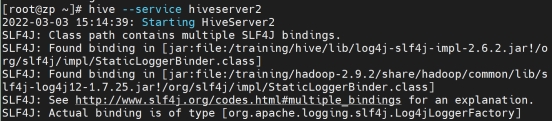
然后挂着这个终端
2.再打开第二个终端

这个终端负责写指令
3.然后在新的终端输入beeline 用来显示表格框框
4.输入指令 ! connect jdbc:hive2://zp:10000/default (zp是主机名,可以改成自己的)

5.输入用户名密码(虚拟机登录时的用户名密码)

6.然后开始在终端中写Hive指令
*基础:*
展示所有数据库:
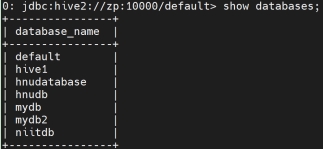
展示这个数据库的内容:

展示默认数据库:
describe database default;

创建数据库:
Create database db_name;
create database if not exists db_name;

创建数据库时添加注释:
create database if not exists niit_db1 comment “Its NIIT Database”;
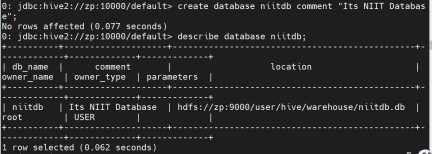
创建数据库时添加属性:
create database if not exists db2 with dbproperties(‘creator’=’DPS’,’date’=’2021-03-02’);

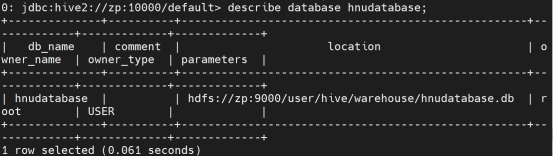
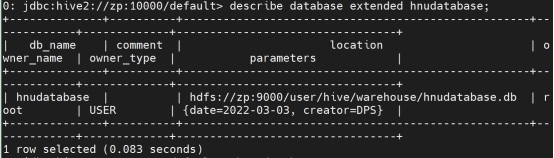
展示数据库的属性:
describe database extended db1;
数据库中无表时删除数据库:
drop database db_name;

数据库有表时删除数据库:
drop database if exists db_name CASCADE;

创建表:
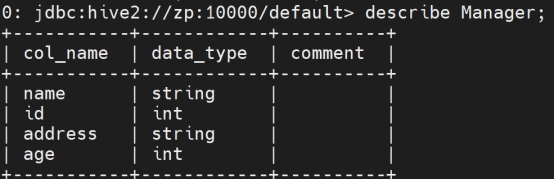
create table Manager(name string, id int,address string,age int) row format delimited fields terminated by ‘,’ lines terminated by ‘\n’ stored as textfile;

建表:


展示表:
describe tb_name;
获取默认位置:
set hive.metastore.warehouse.dir

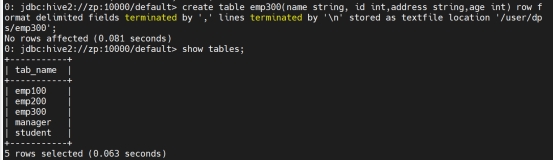
将表存储到另一个位置:
create table manager1(name string, id int,address string,age int) row format delimited fields terminated by ‘,’ lines terminated by ‘\n’ stored as textfile location ‘/user/dps/manager1’;

删除表:
drop table if exists tb_name;

重命名表:
alter table tb_name rename to new_tb_name;

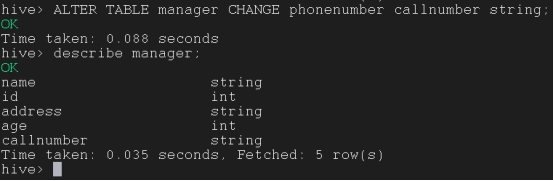
更改列名和数据类型:
ALTER TABLE tb_name CHANGE old_column new_column data_type;
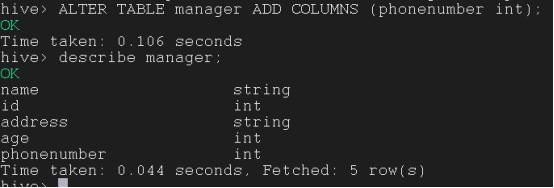
在现有表中添加新列:
ALTER TABLE tb_name ADD COLUMNS (dept STRING COMMENT ‘Department name’);
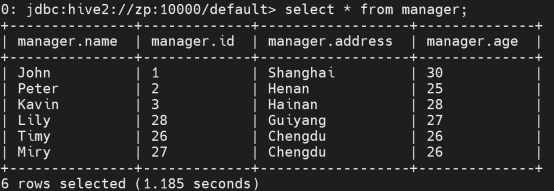
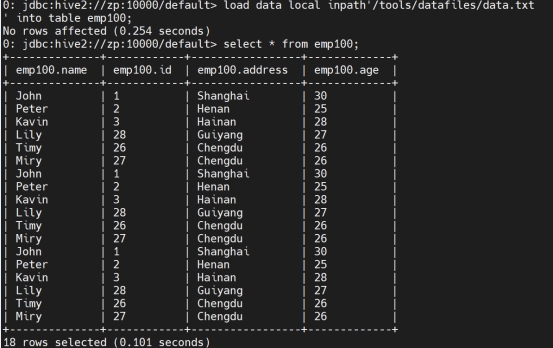
从本地加载数据:(不会覆盖,如果输入两次相同的指令会在表中叠加)
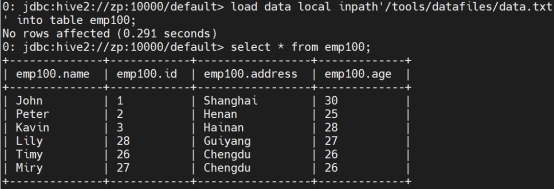
load data local inpath’/tools/datafiles/data.txt’ into table manager;

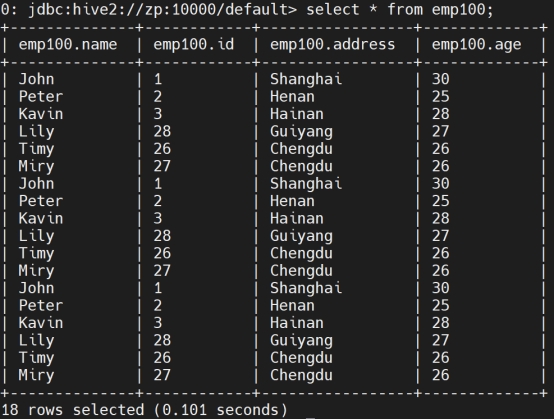
检索数据:
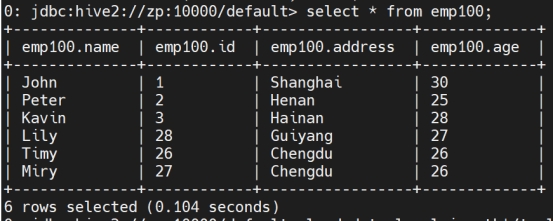
Select * from manager;
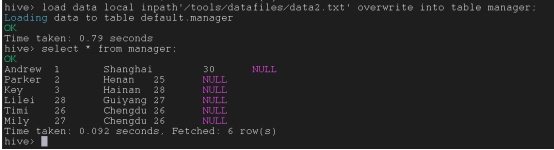
覆盖表中的现有数据:
load data local inpath’/tools/datafiles/data2.txt’ overwrite into table manager;
将文件从本地复制到HDFS:
a) 先在HDFS中创建文件夹
hdfs dfs -mkdir /user/files

b) 从本地复制到HDFS
hdfs dfs -copyFromLocal /tools/datafiles/data.txt /user/files
或者
hdfs dfs -put /tools/datafiles/data2.txt /user/files

从HDFS加载数据到表中:
load data local inpath’/tools/datafiles/data.txt’ into table manager;

*Hive管理:*
内部表:
内部表是由Hive控制的。
metastore存储的元数据和HDFS的实际数据都被Hive控制。
访问内部表数据的唯一方法是使用Hive。不管数据的位置是HDFS还是Hive自己的仓库目录。
Hive不允许任何其他应用程序访问这些数据。如果我们必须访问内部表的数据,我们只能对这些数据使用Hive查询。
当我们删除内部表时,元数据和实际数据都会丢失,因为它们都被Hive控制。
默认情况下,如果我们创建的表没有使用“external”关键字,那么它将是内部表。
因为默认情况下,如果表没有被提到为外部表,那么它的内部表。
create table manager2(name string, id int,address string,age int) row format delimited fields terminated by ‘,’ lines terminated by ‘\n’ stored as textfile;

外部表:
在外部表的情况下,只有存储在metastore的元数据被Hive控制。.
HDFS的实际数据不受Hive控制。当我们删除外部表时,只有元数据会丢失。我们可以通过其他应用,比如HBase,来访问外部表。
如果我们创建一个表使用’external’关键字,那么它将是外部表。
Create external table manager3(name string, id int,address string,age int) row format delimited fields terminated by ‘,’ lines terminated by ‘\n’ stored as textfile;

显示列
Set hive.cli.print.header=true

Insert指令将数据从一个表加载到另一个表
(两个表的列数,列名以及每个列的数据类型都要相同)
Insert into table tar_table select col1,col2,col3 from source_tab;
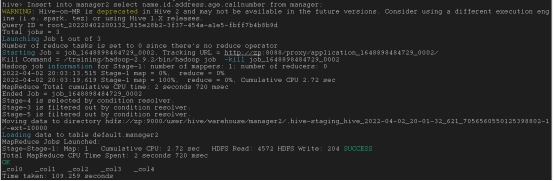
(重复多次不会覆盖只会叠加)
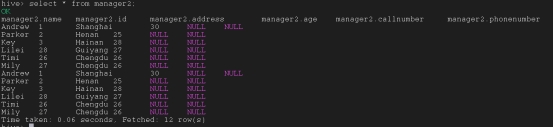
将一个表中的数据重写覆盖进另一个表
Insert overwrite table tar_table select col1,col2,col3 from source_tab;
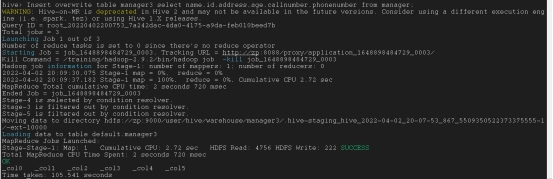
在特定行覆盖表中信息
Insert overwrite table tar_table select col1,col2,col3 from source_tab where col3=’Shanghai’;
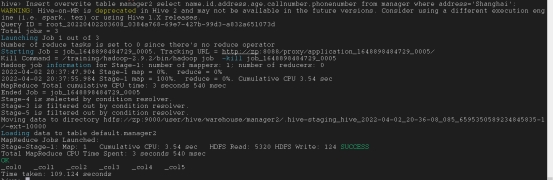
将一个表的数据插入到多个表中

重写列名
alter table manager replace columns(callnumber intstring, phone int);
只剩这些行,剩多少行剩多少数据,但是数据类型要一样
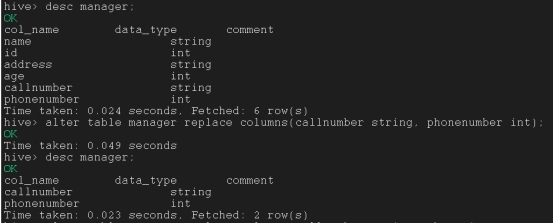
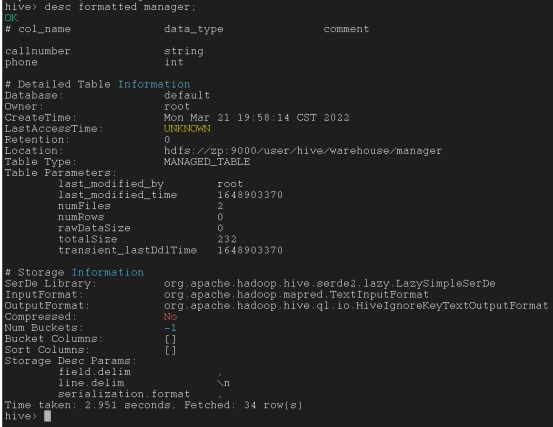
显示表的元数据
desc formatted emp;
设置表的属性
alter table emp set tblproperties(‘auto.purge’=’true’);

改变表的数据类型
alter table emp set fileformat avro;

静态分区:
n 将输入数据文件单独插入分区表是静态分区。
n 通常在将文件(大文件)加载到 Hive 表时,首选静态分区。
n 与动态分区相比,静态分区可以节省加载数据的时间。
n 您可以“静态地”在表中添加一个分区,并将文件移动到表的分区中。
n 我们可以改变静态分区中的分区。
分区表
Hive 分区的类型
n 您可以从文件名、日期等获取分区列值,而无需读取整个大文件。
n 如果要在 Hive 中使用静态分区,应在 hive-site.xml 中默认设置属性 set hive.mapred.mode=strict 此属性集
n 静态分区处于严格模式。
n 应该使用 where 子句在静态分区中使用 limit。
n 您可以在 Hive 管理表或外部表上执行静态分区。
创建分区
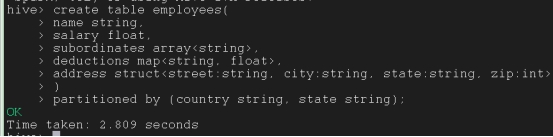
静态分区表
create table if not exists part_dept (deptno int,empname string,sal int) partitioned by (deptname string) row format delimited fields terminated by’,’ lines terminated by’\n’stored as textfile;

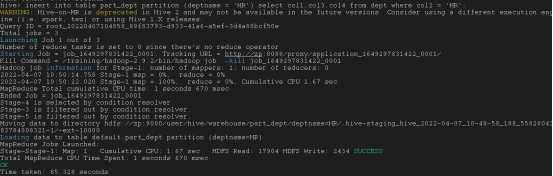
静态分区负荷
insert into table part_dept partition (deptname = ‘HR’) select col1,col3,col4 from dept where col2 = ‘HR’;
load data local inpath’/tools/datafiles/act’into table part_dept partition( deptname =’Accounts’);

动态分区
n 对分区表的单个插入称为动态分区。
n 通常,动态分区从非分区表加载数据。
n 与静态分区相比,动态分区在加载数据方面花费更多的时间。
n 当您在表中存储了大量数据时,动态分区是合适的。
n 如果您想划分多个列,但不知道有多少列,那么动态分区也是合适的。
n 动态分区使用 limit 不需要 where 子句。
n 我们无法在动态分区上执行 alter。
n 您可以对 Hive 外部表和托管表执行动态分区。
n 如果要在 Hive 中使用动态分区,则该模式为非严格模式。
n 以下是您应该允许的 Hive 动态分区属性
默认情况下,Hive 中禁用动态分区。因此,首先我们需要通过设置以下两个属性在 Hive 中启用动态分区。
set hive.exec.dynamic.partition=true;
set hive.exec.dynamic.partition.mode=nonstrict;

创建动态分区表
create table if not exists dyna_part_dept (deptno int,empname string,sal int) partitioned by (deptname string) row format delimited fields terminated by’,’ lines terminated by’\n’stored as textfile;

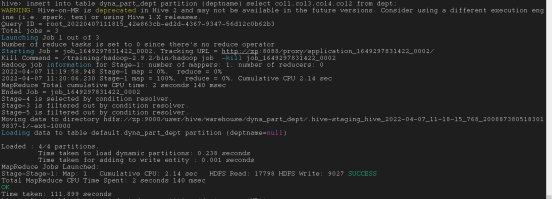
动态分区负荷
insert into table dyna_part_dept partition (deptname) select col1,col3,col4,col2 from dept;
删除分区
alter table dyna_part_dept drop partition (deptname = ‘HR’);

添加分区
alter table dyna_part_dept add partition (deptname = ‘Dev’);

导入信息到分区

msck repair table dyna_part_dept;

创建分桶
create table if not exists dept_buck(deptno int,empname string,sal int, location string)
partitioned by (deptname string) clustered by (location ) into 4 buckets
row format delimited fields terminated by’,’ lines terminated by’\n’ stored as textfile;

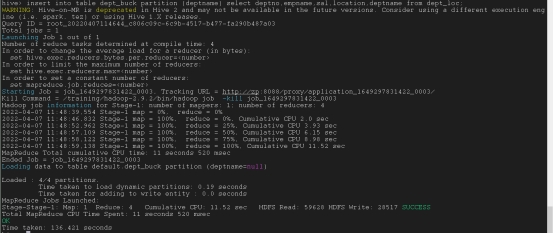
导入信息到分桶
insert into table dept_buck partition (deptname) select deptno,empname,sal,location,deptname from dept_loc;
使用分桶
set hive.enforce.bucketing=true;
set hive.exec.dynamic.partition.mode=nonstrict;
分桶采样
select deptno, empname,sal,location from dept_buck tablesample(bucket 1 out of 2 on location);

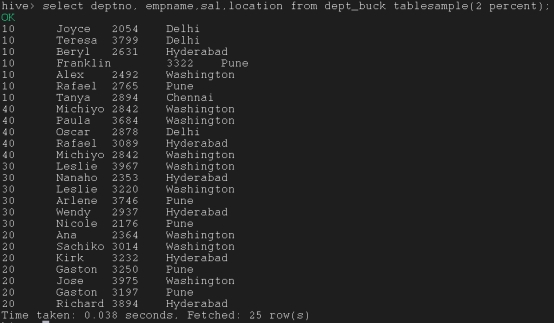
select deptno, empname,sal,location from dept_buck tablesample(2 percent);
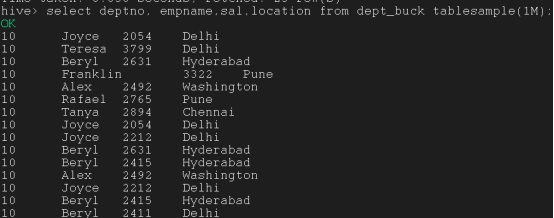
select deptno, empname,sal,location from dept_buck tablesample(1M);
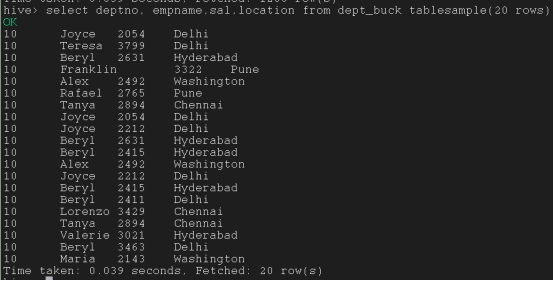
select deptno, empname,sal,location from dept_buck tablesample(20 rows);
保护模式
No_drop子句
防止数据被删除,控制不能使用drop table命令
alter table tb_name enable no_drop;
取消no_drop控制
table tb_name disable no_drop;
在分区中应用no_drop
alter table tb_name partition (deptname=’HR’) enable no_drop;
控制no_drop后尝试删除分区
alter table tb_name drop partition (deptname=’HR’);
取消分区中的no_drop控制
alter table tb_name partition (deptname=’HR’) disable no_drop;
Offline子句
防止数据被查询
alter table tb_name enable offline;
撤销防查指令
alter table tb_name disable offline;
防止分区数据被查询
table tb_name drop partition (deptname=’HR’) enable offline;
撤销分区防查指令
alter table tb_name drop partition (deptname=’HR’) disable offline;
创建临时表
create temporary table table_name (col1 datatype1,…);
或者
create temporary table emp100(id int, name string, gender string, age_in_years double, weight_in_kg double,age_in_company double, salary double, city string, state string, region string) row format delimited fields terminated by ‘,’ lines terminated by ‘\n’ stored as textfile;

一些重要的Hive指令
插入指令(会另外开辟一行插入)
INSERT INTO table_name(col1,col2,col3) values(val1,val2,val3);
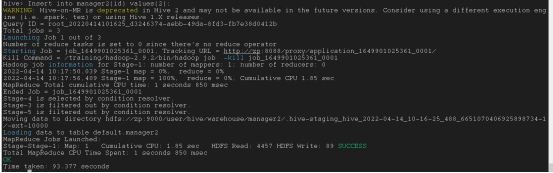
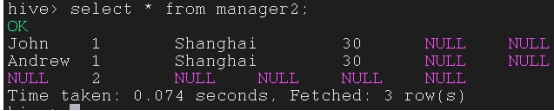
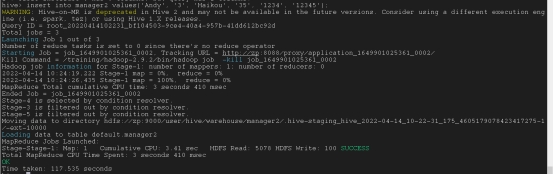
INSERT INTO table_name values(val1,val2,…);
以这种方式添加行必须要全部填满,有多少列就要有多少值,而且每个值要用单引号’’引上
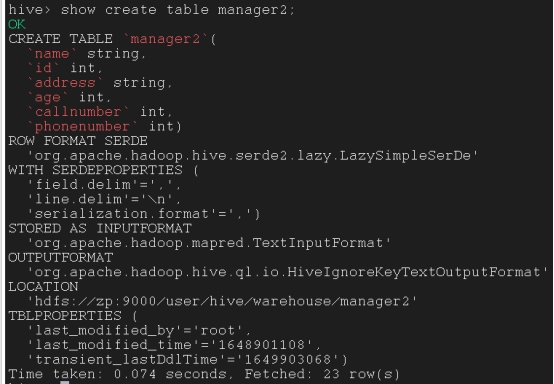
为现有表生成create table指令
Show create table table_name;
描述表的指令
Describe table_name

describe formatted table_name;
表及分区格式化信息
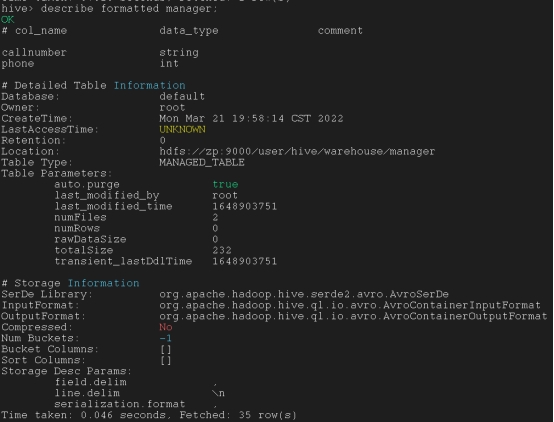
describe extended table_name;
带描述列信息查看

Create table table_name like model_table_name
复制现有表的模式而不复制其数据,可以使用CREATE table LIKE命令

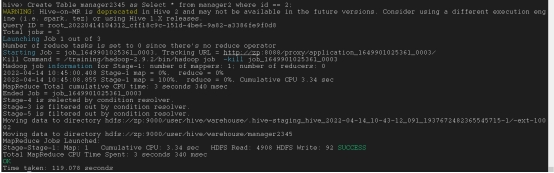
Create Table table_name as Select
Create Table manager2345 as Select * from manager2 where id == 2;
以表的模式以及导入输出的值来创建一个新表
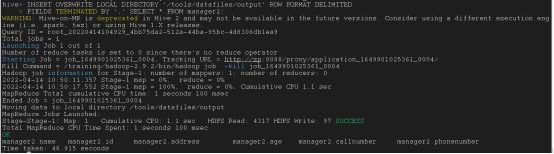
将hive数据导出
set hive.cli.print.header=true;

INSERT OVERWRITE LOCAL DIRECTORY ‘/tools/datafiles/output(导出文件位置)’ ROW FORMAT DELIMITEDFIELDS TERMINATED BY ‘,’ SELECT * FROM table_name;
*第三章 HQL语法*
创建表
create table employee(id int, name string, gender string, age_in_years double, weight_in_kg double,age_in_company double, salary double, city string, state string, region string) row format delimited fields terminated by ‘,’ lines terminated by ‘\n’ stored as textfile;
从本地导入数据
load data local inpath’/tools/datafiles/emp.csv’ into table employee;
Select子句
SELECT [ALL | DISTINCT] select_expr, select_expr, …
FROM table_reference
[WHERE where_condition]
[GROUP BY col_list]
[ORDER BY col_list]
[CLUSTER BY col_list
| [DISTRIBUTE BY col_list] [SORT BY col_list]
]
[LIMIT [offset,] rows]
挑选出所有列
SELECT * from table_name;
挑选出特定列
SELECT col1 from table_name;
挑选出n个列
SELECT col1, col2,….coln from table_name;
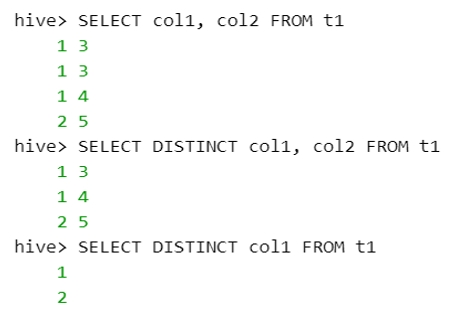
All和distinct子句
ALL 和 DISTINCT 选项指定是否返回重复的行。如果未指定,则默认值为 ALL(返回所有行)。
DISTINCT 指定从结果集中删除重复行。
没声明distinct时默认为all,在这种情况下,重复的行不会从查询结果中删除
SELECT * from table_name;
如果指定了DISTINCT选项,则查询结果中将排除所有重复的数据值行
SELECT distinct col1 from table_name;
Where子句
SELECT * FROM sales WHERE amount > 10 AND region = “US”
Order by子句
用来使检索列按照某种格式升序或降序排列
升序排列:
SELECT Id, Name, Dept FROM employee ORDER BY DEPT;
降序排列:
SELECT Id, Name, Dept FROM employee ORDER BY DEPT desc;
Sort by子句
Hive支持SORT BY,可以对每个reducer的数据进行排序。“order by”和“sort by”之间的区别是,前者保证输出中的全部顺序,而后者只保证减速机中行的顺序。如果有多个reducer,“sort by”可能给出部分排序的最终结果。
SELECT Id, Name FROM employee sort by id;
在HQL中,Cluster By被用作distribute By和sort By子句的替代。
SELECT Id, Name from employees CLUSTER BY Id;
Hive中用于表的Cluster BY子句。Hive使用Cluster by中的列将行分布到reducer中。Cluster BY列将转到多个reducer
SELECT Id, Name from employees distributed BY sort by Id;
Group by子句
用于使用特定的集合列对结果集中的所有记录进行分组。用于查询一组记录。
select region, avg(salary) from employee group by region;
Having子句
HAVING子句被添加到Hive是因为WHERE关键字不能用于聚合函数
聚合函数:avg, max, min, sum, count
select region, avg(salary) from employee group by region having avg(salary)>10;
Like和RLike
Like: 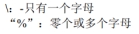
select id,name,salary from employee where name like ‘_u%’;
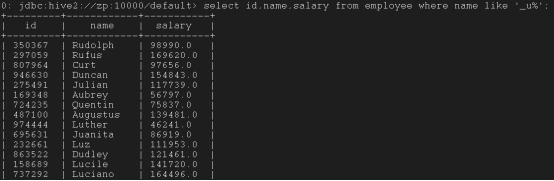
RLike: 可以使用Java正则表达式,只要任何一个与之匹配则计算结果就为TRUE
select id,name,salary from employee where name rlike ‘(Hugh|Deane)’;

Hive 集运算符
Union: 从结果集中删除重复的行
Union all: 不会从结果集中删除重复的行
*Hive链接*
准备:
create table if not exists emp_tab (col1 int,col2 string,col3 string,col4 int,col5 int,col6 int,col7 string) row format delimited fields terminated by’,’ lines terminated by’\n’stored as textfile;
create table if not exists dept_tab (col1 int,col2 string,col3 string,col4 string) row format delimited fields terminated by’,’ lines terminated by’\n’stored as textfile;
create table if not exists third_tab (col1 int,col2 string,col3 string) row format delimited fields terminated by’,’ lines terminated by’\n’stored as textfile;
load data local inpath’/tools/datafiles/emp_tab.txt’ into table emp_tab;
load data local inpath’/tools/datafiles/dept_tab.txt’ into table dept_tab;
load data local inpath’/tools/datafiles/third_tab.txt’ into table third_tab;
内部链接/等效链接
Select emp_tab.col1,emp_tab.col2,emp_tab.col3,dept_tab.col1,dept_tab.col2,dept_tab.col3 from emp_tab join dept_tab on (emp_tab.col6 = dept_tab.col1);
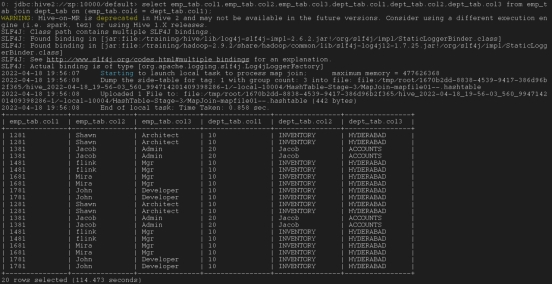
外部链接:
左外链接 :JOIN 操作符左边表中符合 WHERE 子句的所有记录将会被返回。以左边表为主,右边如果没有值就补null
select emp_tab.col1,emp_tab.col2,emp_tab.col3,dept_tab.col1,dept_tab.col2,dept_tab.col3 from emp_tab left outer join dept_tab on (emp_tab.col6 = dept_tab.col1);
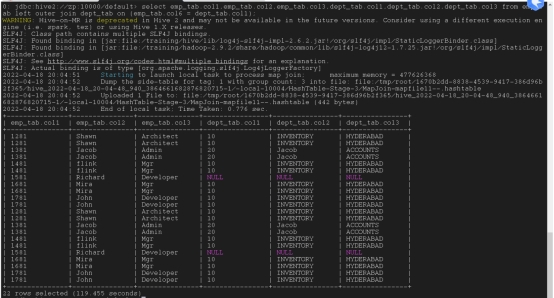
右外链接: JOIN 操作符右边表中符合 WHERE 子句的所有记录将会被返回。以右边表为主,左边如果没有值就补null
select emp_tab.col1,emp_tab.col2,emp_tab.col3,dept_tab.col1,dept_tab.col2,dept_tab.col3 from emp_tab right outer join dept_tab on (emp_tab.col6 = dept_tab.col1);
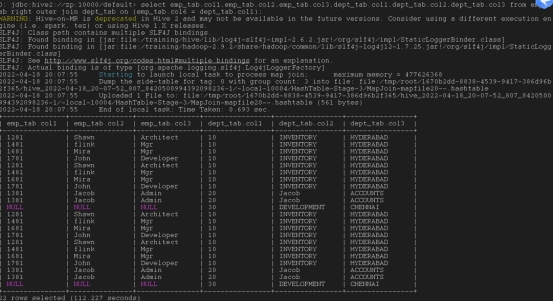
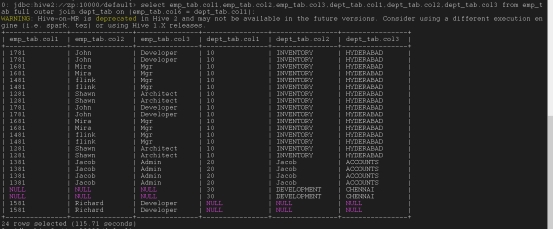
完全外部链接:谁没有就补null
select emp_tab.col1,emp_tab.col2,emp_tab.col3,dept_tab.col1,dept_tab.col2,dept_tab.col3 from emp_tab full outer join dept_tab on (emp_tab.col6 = dept_tab.col1);
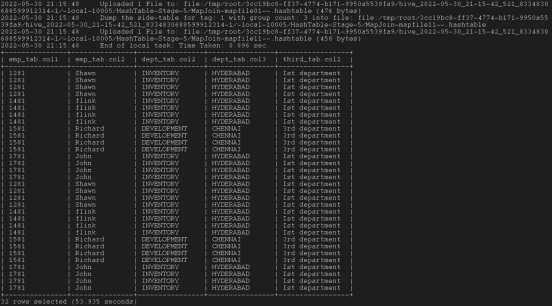
连接三个表:最后join最大的表,这样可以加快处理速度
Select emp_tab.col1,emp_tab.col2,dept_tab.col2,dept_tab.col3,third_tab.col2 from emp_tab join dept_tab on ( emp_tab.col7 = dept_tab.col4 ) join third_tab on ( dept_tab.col1 = third_tab.col1);
*筛选词*
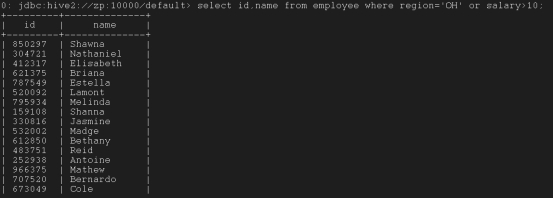
And并且, or或者, between之前, in在给定值内, not in不在给定值内, limit限定几行
select id,name from employee where region=’OH’ or salary>10;
select id,name from employee where region=’OH’ and salary>10;

select id,salary from employee where salary between 10 and 12;

select id,salary from employee where salary in (11.35,12);

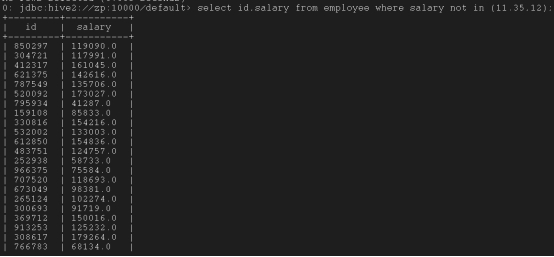
select id,salary from employee where salary not in (11.35,12);
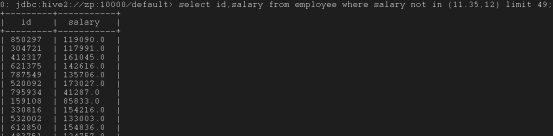
select id,salary from employee where salary not in (11.35,12) limit 49;
*打印表头*
打开配置:Set hive.cli.print.header=true

*用正则表达式查询特定的列*
set hive.support.quoted.identifiers=none;

*设置列别名*
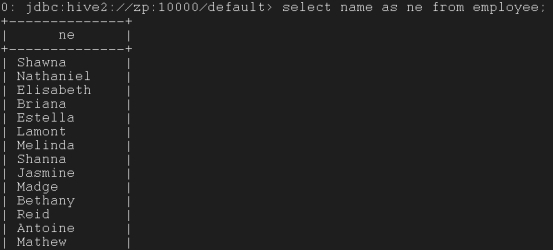
select name as ne from employee;
*嵌套选择*
(一个表中的嵌套)
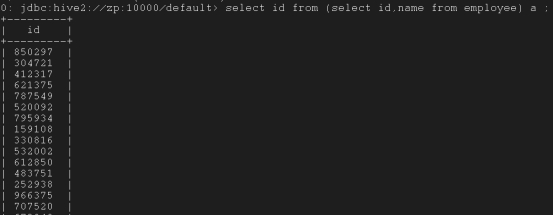
select id from (select id,name from employee) a ;(这个a可以是任何词,只是作为一个EOF)
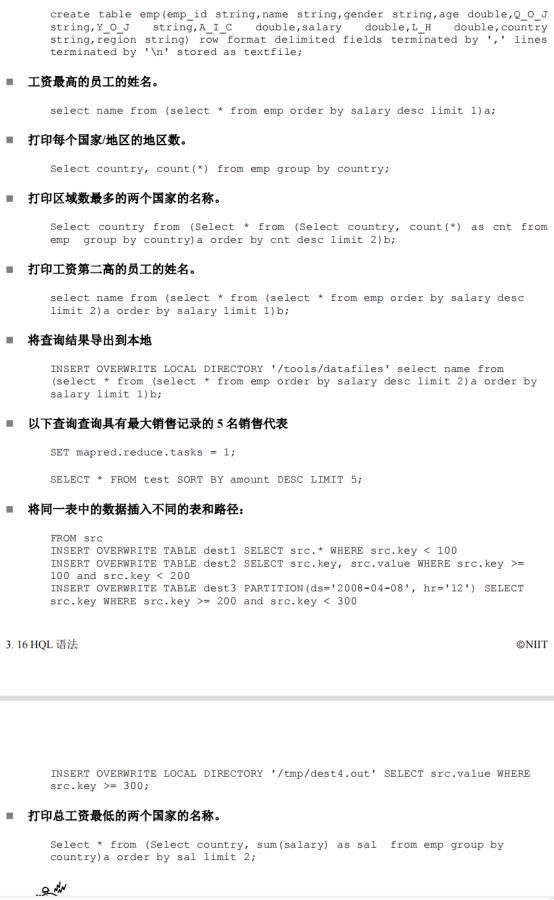
select name from (select * from employee order by salary desc limit 1) a;(工资最高的人的名字)

(不同表中的嵌套)
select * from student where id in (select id from employee);
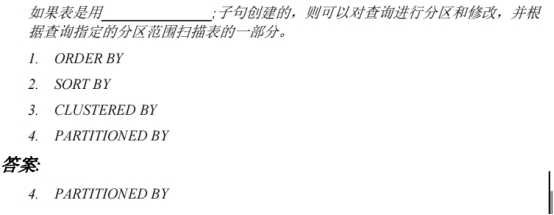
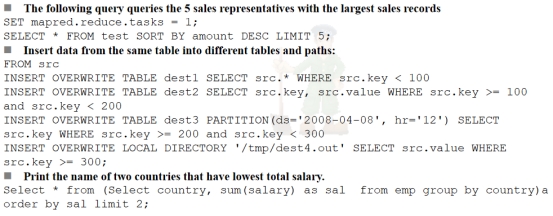
一些示例
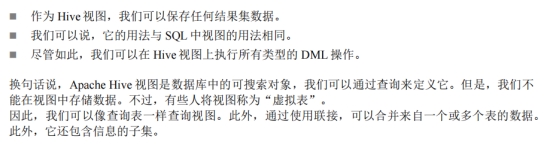
*Hive 视图*
创建视图语法:
Create view view_name {column_name,column_name…} as select…
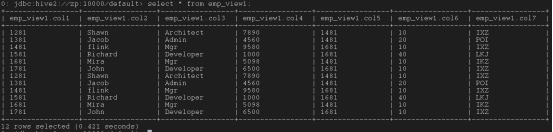
create view emp_view1 as select * from emp_tab;
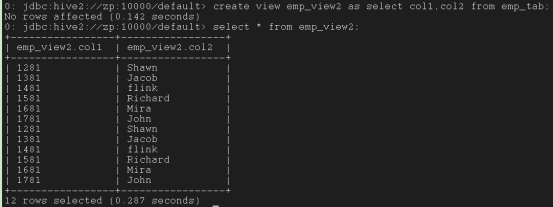
create view emp_view2 as select col1,col2 from emp_tab;
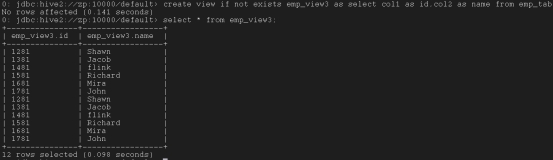
create view if not exists emp_view3 as select col1 as id,col2 as name from emp_tab;
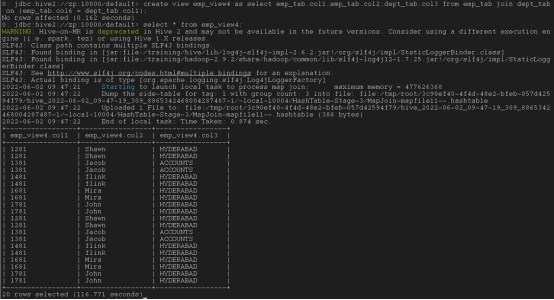
create view emp_view4 as select emp_tab.col1,emp_tab.col2,dept_tab.col3 from emp_tab join dept_tab on (emp_tab.col6 = dept_tab.col1);
修改视图语法:
alter view emp_view1 as select col1 from emp_tab;
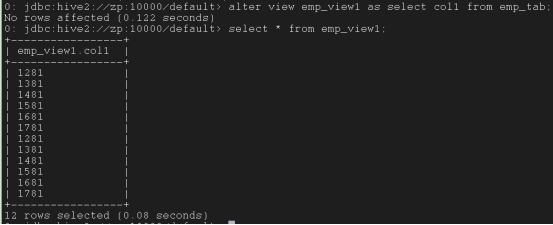
重命名视图语法:
alter view emp_view1 rename to emp_view_new;

删除视图语法:
drop view emp_view_new;

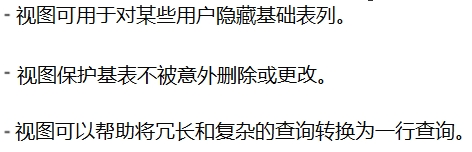
视图的优点:
*高级表属性*
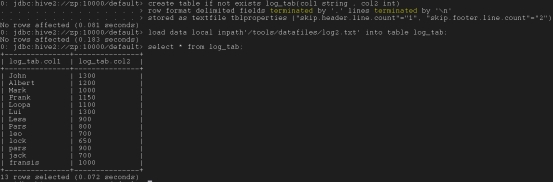
去掉页眉页脚(直接略过上下两行):
create table if not exists log_tab (col1 string ,col2 int)
row format delimited fields terminated by ‘,’ lines terminated by ‘\n’
stored as textfile tblproperties (“skip.header.line.count”=”1”, “skip.footer.line.count”=”2”);
load data local inpath’/tools/datafiles/log2.txt’ into table log_tab;
*Hive不可变属性*

创建一个不可变表:
create table if not exists dept_imu (col1 int,col2 string,col3 string,col4 int) row format delimited fields terminated by’,’ lines terminated by’\n’stored as textfile tblproperties (“immutable”=”true”);

试图修改数据:报错
insert into table dept_imu select * from dept;

试图重修数据:成功
insert overwrite table dept_imu select * from dept;

Insert overwrite指令不受不可变属性影响
*Hive null属性*

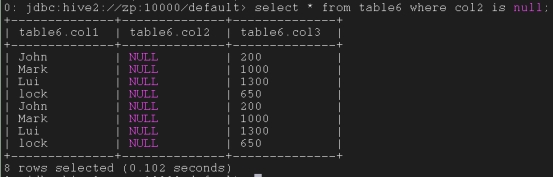
如果源数据有一个部分为空,正常情况下就是一个空值,加入此属性后表中的内容为null
create table if not exists table6 (col1 string, col2 string, col3 int) row format delimited fields terminated by ‘,’ lines terminated by ‘\n’ stored as textfile tblproperties (“serialization.null.format”=””);

*第四章 Hive运算符和函数*
*Hive运算符*
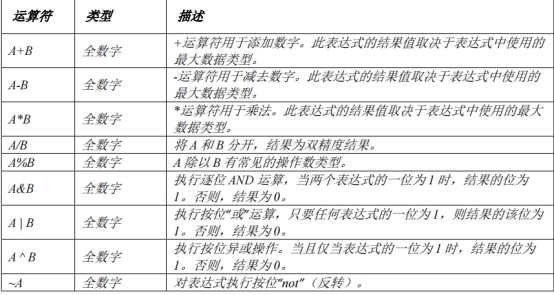
算术运算符:
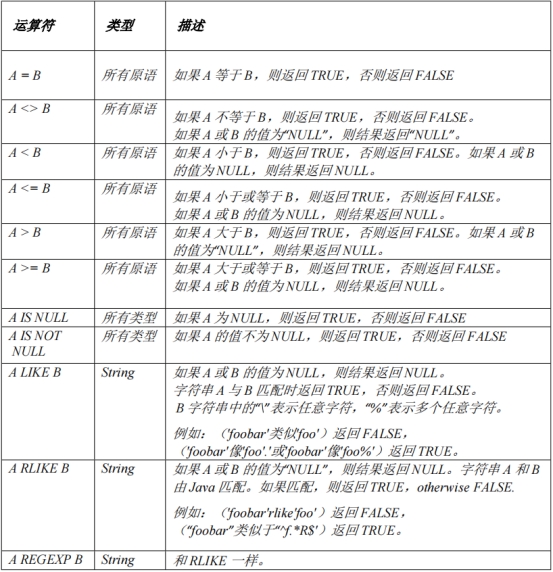
关系运算符:
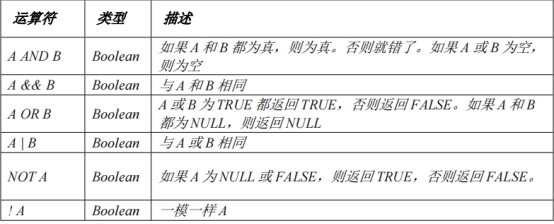
逻辑运算符:
字符串运算符:

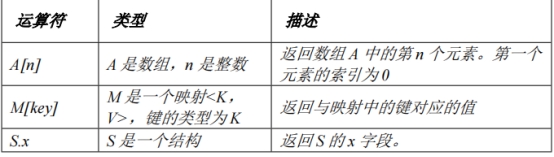
复杂类型运算符:
*Hive函数*
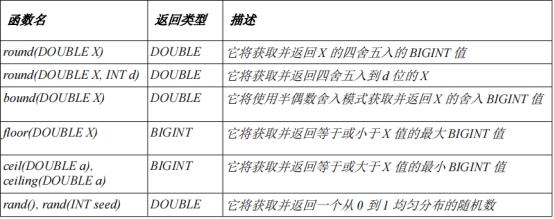
数学函数:
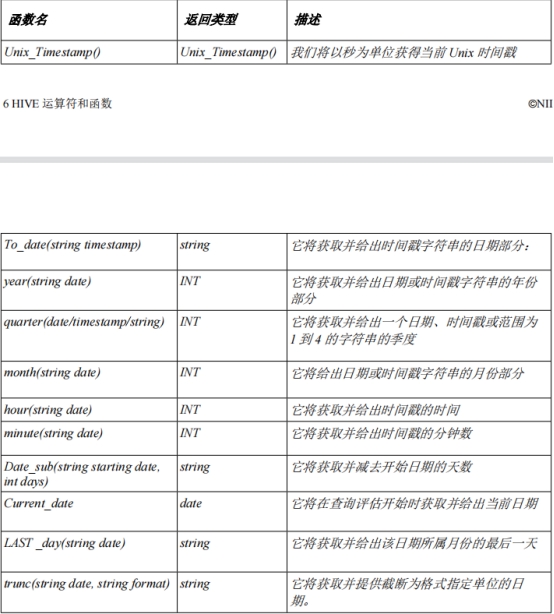
日期函数:
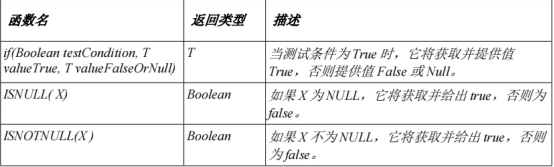
条件函数:
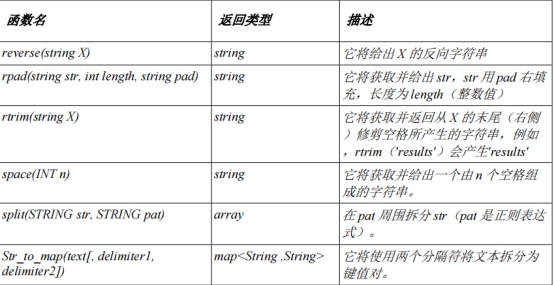
字符串函数:
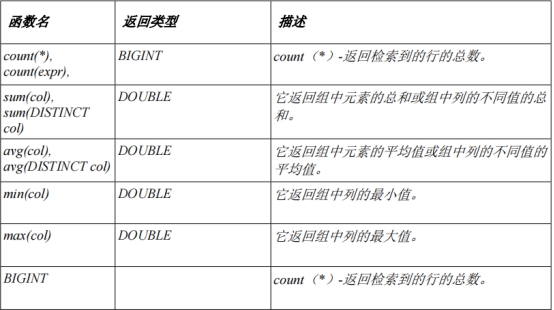
内置聚合函数:
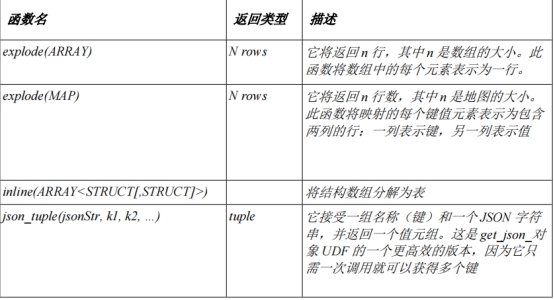
内置表生成函数:
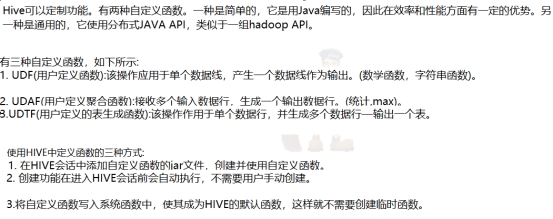
Hive自定义函数:
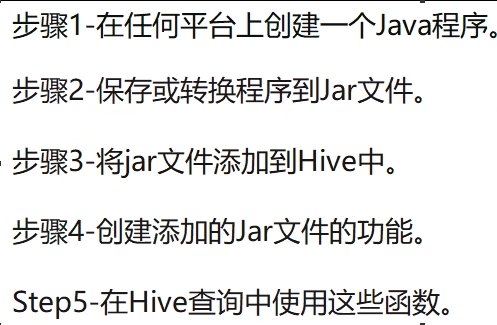
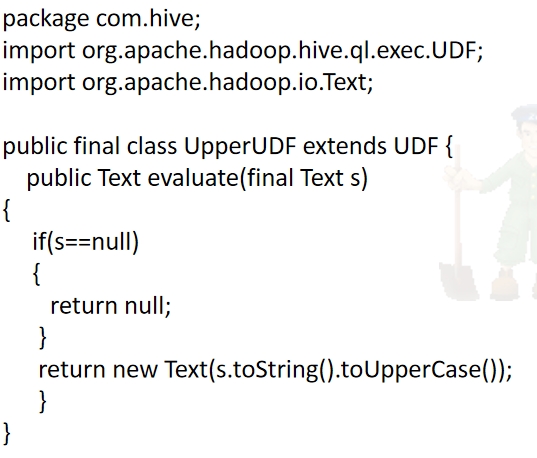
用JavaAPI自定义函数:
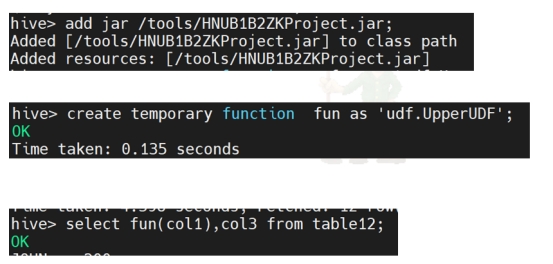
导入jar包并运行:
 wechat
 alipay